2023-11-27
[Incognito CTF 2023] The Phantom Thief's Stolen DB Writeup
A writeup for 괴도가 훔쳐간 DB ("The DB the phantom thief stole"), a Forensic challenge from Incognito CTF 2023 (held November 24–25, 2023). The task is to recover a deleted record from a SQLite file — data a DB viewer won't show you, so it has to be found by parsing the page structure by hand in a hex editor.
The challenge
The phantom thief Kid stole an important DB and some of the data was deleted. Let's recover it.
Timezone : KST
flag :
INCO{username_password_YYYY-MM-DD HH:MM:SS_the text shown in the recovered image}
Which record went missing
I started by opening the db file in DB Browser for SQLite.
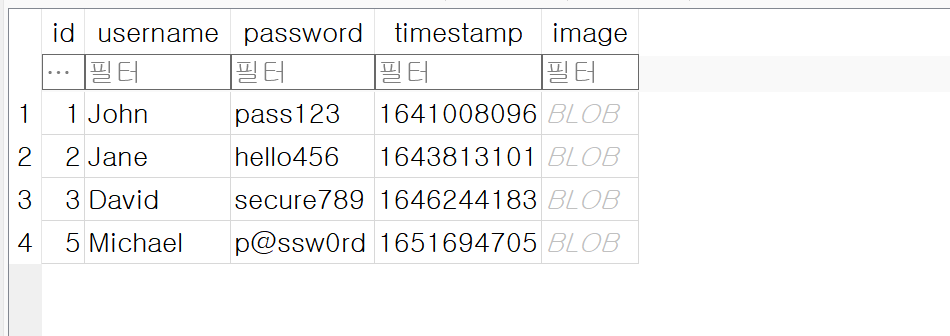 Only the record with id 4 is missing.
The row with id 4 is the only one gone, so that's the record to recover. But that's as far as the viewer takes you — from here on the file has to be opened in HxD and the SQLite format walked by hand.
Header and page size
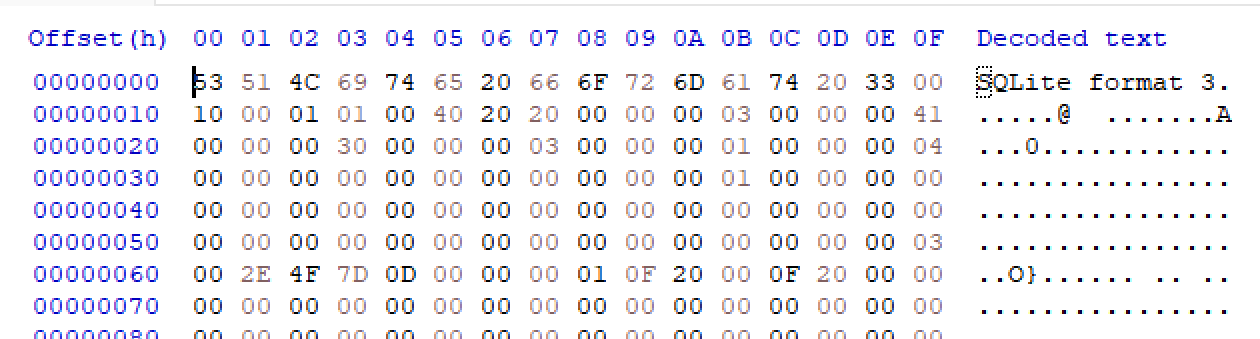 The database header.
In the SQLite database header, the two bytes at offset 0x10 give the page size.
- page size =
0x1000(big endian)
So page N sits at file offset (N - 1) * 0x1000. Every calculation below follows
from that.
Finding the root page from the schema table
Scrolling down past the header, the schema table (sqlite_master) appears.
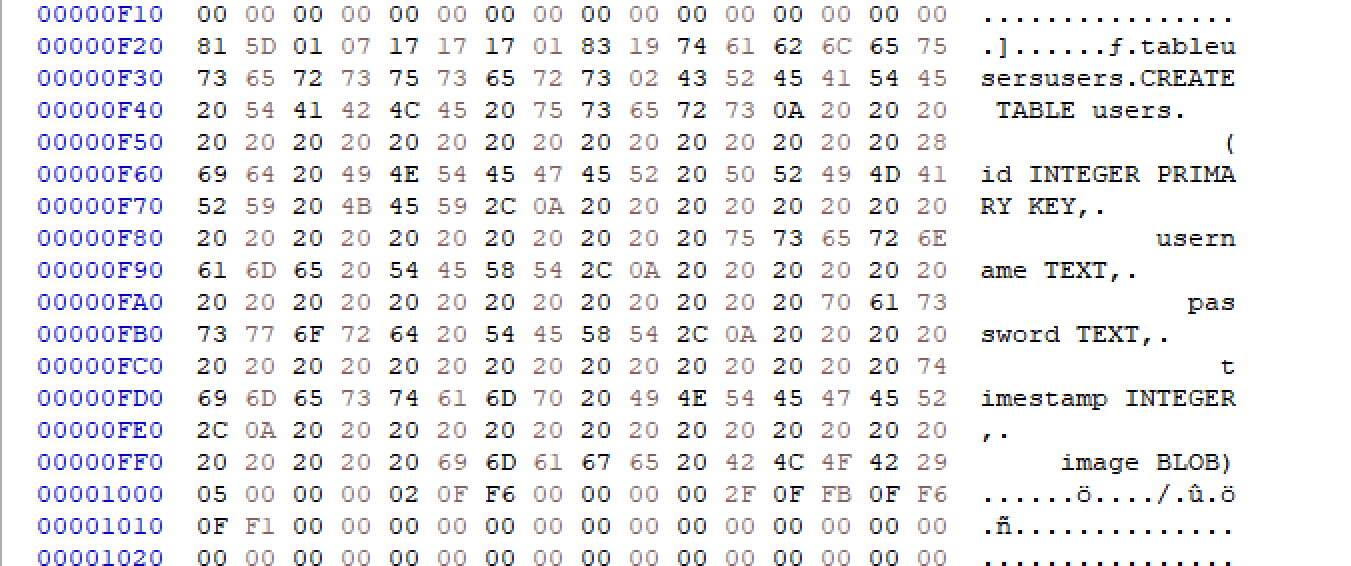 The
The CREATE TABLE statement stored in the schema table.
The root page number of the table is stored right before its statement in the schema table.
0x02⇒(2 - 1) * 0x1000= located at0x1000
Parsing the root page
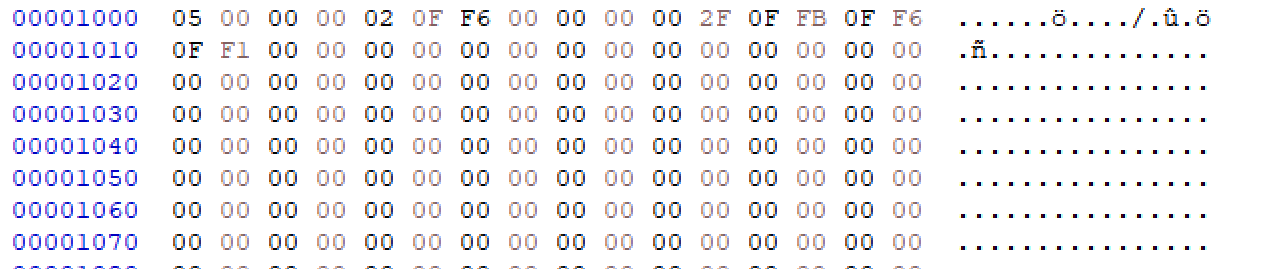 The header of the root page at
 0x1000.
Reading the page header field by field:
| Offset | Value | Meaning |
|---|---|---|
0x00 | 0x05 | internal page |
0x03 (2 bytes) | 0x00 02 | cell count in this page = 2 |
0x05 (2 bytes) | 0x0F F6 | offset of the first cell = 0x0FF6 |
0x08 (4 bytes) | 0x00 00 00 2F | right child page = 0x2F ⇒ 0x2E000 |
0x0C onward | — | the array of cell offsets within the page |
And here's the odd part: the cell count says 2, but the offset array holds three entries. That's the moment you start suspecting the deleted data is sitting behind that third one.
Following the cells
 The offset array holds three entries:
 0FFB, 0FF6, 0FF1.
I visited the cell at each offset in turn.
0FFB → 0x00 00 00 19 (= 0x18000)
 Leaf page, 1 record in the page, offset
 07D0.
0FF6 → 0x00 00 00 1A (= 0x19000)
 Leaf page, 1 record in the page, offset
 045A.
0FF1 → 0x00 00 00 05 (= 0x4000)
 This one was not a leaf page.
The pages behind 0FFB and 0FF6 start with 0D, so they are indeed leaf pages, but
where 0FF1 points there was only meaningless data. Nothing lost seemed to live in
that page.
Checking the surviving records
Walking the tree, I checked the records that were still there.
 Page
Page 0x19 holds John's data.
 Page
Page 0x1A holds Jane's data.
I also checked the root page's right child page (0x2F ⇒ 0x2E000).
 Leaf page, 2 records in the page, offsets
 01DC and 0669.
 Michael's and David's data.
That accounts for John, Jane, Michael, and David — exactly the records the viewer showed. The missing record 4 was not attached anywhere in the tree.
Finding the orphaned page
When a record is deleted in SQLite, the page itself often stays in the file untouched.
So I searched the whole file for pages starting with 0D, the leaf page signature.
 There was one more leaf page that nothing in the tree referenced.
I jumped to that location.
 It holds 2 records.
 Michael's and Emily's data.
There it is. The lost record is {04, Emily, letmein, timestamp, photo} — username
Emily, password letmein.
Recovering the timestamp

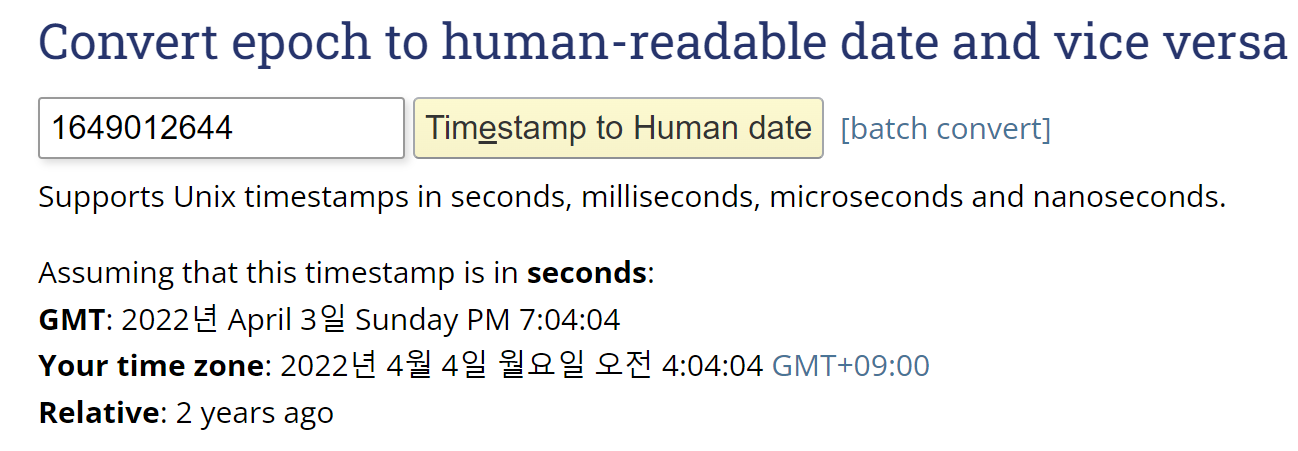
2022-04-04 04:04:04.
The timestamp in KST, as the challenge asked for, is 2022-04-04 04:04:04.
Recovering the photo — following the page chain
That leaves the photo stored in the record. From its header it was a JFIF/JPEG.
The problem is that the image doesn't fit in a single page. Cutting it off at the end of
the page and opening it showed the image breaking up partway through, and simply
appending the chunk containing the JPEG footer (FF D9) didn't make it open either.
So I first worked out how the photos of the other records were chained together. Comparing a photo downloaded normally from the DB against the raw bytes in the file, it turned out that the last 4 bytes of each page point to the next page number — SQLite's overflow page chain.
Following that rule I kept stitching pages together, but from some point the image broke
again. So I worked the other way as well, coming up backwards from the JPEG footer and
matching the pieces that fit. Working upward like that I ran into page 0x2E000 (the one
holding Michael and David), so I stitched only up to the page just before it.
 Not complete, but the text was readable —
 CR3_den_tial.
The image was never fully recovered, but the text shown in it — which is what the
challenge asked for — could be read as CR3_den_tial.
flag
INCO{Emily_letmein_2022-04-04 04:04:04_CR3_den_tial}
Takeaways
- When a record is deleted in SQLite, the page stays in the file; it just loses its
reference from the B-tree. Sweeping the whole file for the leaf page signature (
0D) finds these orphaned pages. - The first clue that something had been deleted was the mismatch between the cell count and the length of the cell offset array in the root page.
- A BLOB too large for one page is spread across an overflow page chain, with the last 4 bytes of each page pointing to the next. Deriving that rule by comparing against an intact record was the key to recovering the photo.
Things I learned later
A few parts of this solve were left as question marks at the time. Studying the SQLite file format afterwards explained most of them, so — leaving the original notes above untouched — here is what I figured out later.
Why orphaned pages exist — the freelist
SQLite doesn't shrink the file when records or pages are deleted (not until VACUUM).
Instead it hangs empty pages on a linked list called the freelist and reuses them
later.
- The 4 bytes at offset
0x20of the database header hold the first freelist trunk page number, and the 4 bytes at0x24hold the freelist page count. - A trunk page carries a list of free leaf page numbers and a pointer to the next trunk page.
The "leaf page nothing in the tree referenced" found in this solve is exactly such a
page, handed over to the freelist. Since joining the freelist does not erase a page's
contents, the records were still sitting there intact. In other words, instead of
sweeping the whole file for the 0D signature, following the freelist pointer in the
header would have led to the same page.
What the "meaningless data" behind 0FF1 actually was
The root page having more entries in the offset array (3) than its cell count (2) is
because, when a cell is deleted, the last entry of the cell pointer array is not
immediately zeroed out — only the cell count in the header shrinks, and the pointer
bytes linger as garbage. For someone hunting deletion traces, that leftover is a gift.
But the child page that pointer used to reference had likely already gone to the
freelist and been reused (as a trunk page or otherwise), which would explain why the
data at 0FF1's target no longer looked like a leaf header.
Why the image never fully recovered
Most likely because some middle pages of the overflow chain were reclaimed into the
freelist and then reused for something else, losing their original contents. Both
the point where the image suddenly broke while following the chain forward, and running
into 0x2E000 (a live leaf page) while working backwards, fit that picture — the middle
of the chain had been overwritten by other pages. Overflow chains of deleted BLOBs
commonly survive only in fragments like this, which is why, for a structured format like
JPEG, matching the surviving pieces backwards from the footer is a genuinely useful
technique in practice too.